Borrow eBooks, Audiobooks & Magazines with Libby
Valley of the Tetons Library uses Libby by Overdrive to give patrons access to THOUSANDS of eBooks, audiobooks and digital magazines. Download Libby to access content from the Idaho Digital Consortium, a group of Idaho libraries that shares digital content so we have access to more than we could provide on our own. The Idaho Digital Consortium has 21,178 unique book, audiobooks and magazine titles available for online check out, with more being added all the time!
Use your library card number found on the back of your library card including the ‘P’ and the space before the number. Your password is your last name in all lower-case letters.
Bring in your device and a librarian can help you get set up. Or call or email our branches with questions –
- Victor – 208-787-2201, victor@votlib.org
- Driggs – 208-354-5522 driggs@votlib.org
More Libby info…
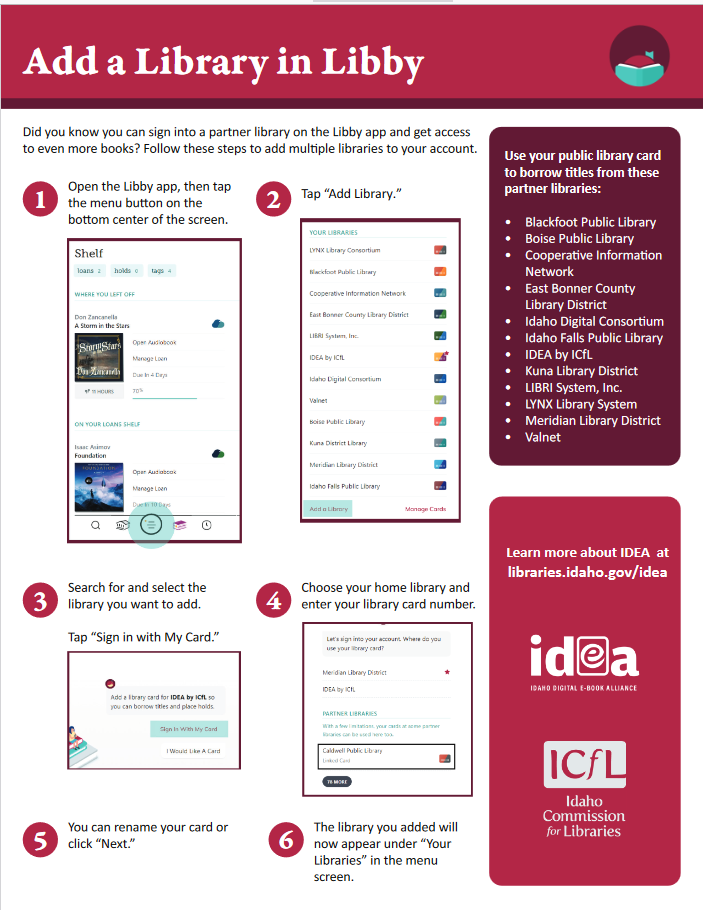
- In addition to thousands of titles in the Idaho Digital Consortium, the Idaho Commission for Libraries has connected Partner Libraries from around the state. Use your Valley of the Tetons Library Card to get access to digital collections from more Idaho libraries including Idaho Falls, Boise, Blackfoot and more! See the graphic below for more info. Agregar una biblioteca en Libby instrucciones en español.
- Online titles check out for one, two or three weeks and are automatically removed from your account at the end of the lending period unless you renew. There are no late fees!
- Magazines are available on the Libby app too! Your library card allows you to access over 3,800 magazines, and they are always adding more. Additionally, magazine checkouts do not count against your total allowed checkout. You can have 10 magazines checked out, and it will not stop you from also checking out books. Another great thing is the magazines are “simultaneous use” so we can have 20 patrons with the same edition of a magazine checked out at the same time!
- Download Libby onto your iphone, android phone, ipad, tablet, kindle fire, kobu, or nook device OR read digital books in any internet browser.
- Request new digital titles through our Purchase Suggestions/Request form here.